H&S Simulation and
Resource Center
1.4 Moving On to Next Step
1.4.1 exporting
Once you complete your model, you can download it and use it to set up your simulation in SimScale. After you click ‘Export’, the following dialog box will open.
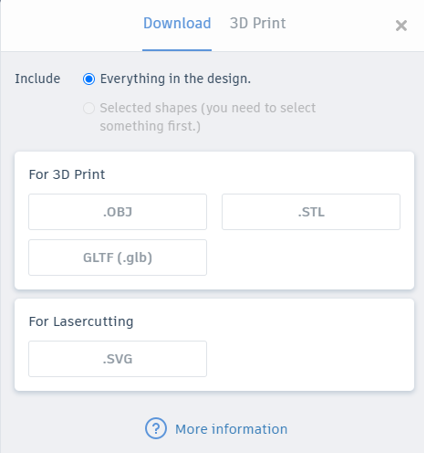
Figure 10: Exporting dialog box
The dialog box may look different if it is on the ‘3D Print’ tab. If it is, select the ‘Download’ tab. Before selecting a file type, make sure the ‘Everything in the design’ option is selected or else only part of the model will be downloaded. Then, select ‘.STL’. The dialog box will close and the model will begin downloading.
1.4.2 Troubleshooting errors
If errors occur after importing your model into SimScale, there is a potential your model contains small faults which prevents SimScale from performing the simulation. The most common structural issues are listed below.
Self-Intersecting Object
Self-intersection usually happens when you have two or more connecting parts of a single shape touching each other with a very tiny intersection. For example, Figure 11 shows a single object that is supposed to have the bottom corner of the inclined plane only touch the lower horizontal surface at point 1. However, Figure 12 is zoomed in view at the intersection and shows that rather than just touching, there is a very small intersection.

Figure 11: Self-intersecting geometry

Figure 12: Zoomed in at the intersection
This will cause faults in SimScale when the mesh is being created. To avoid this error, either separate the faces further apart or intersect the faces thoroughly instead of just touching each other.
Non-manifold Edges
A non-manifold edge is an edge created during meshing that happens to have 3 or more triangles joining. This happens when a single 3D model contains an edge that joins more than two surfaces. An example is shown in Figure 13. The edge marked in yellow is a non-manifold edge since it joins four surfaces in total.

Figure 13: Shape with non-manifold edge
A non-manifold edge could cause errors in SimScale. Avoid such structures by either splitting into separated faces or intersecting the faces thoroughly instead of just touching each other.